
GPX Editor
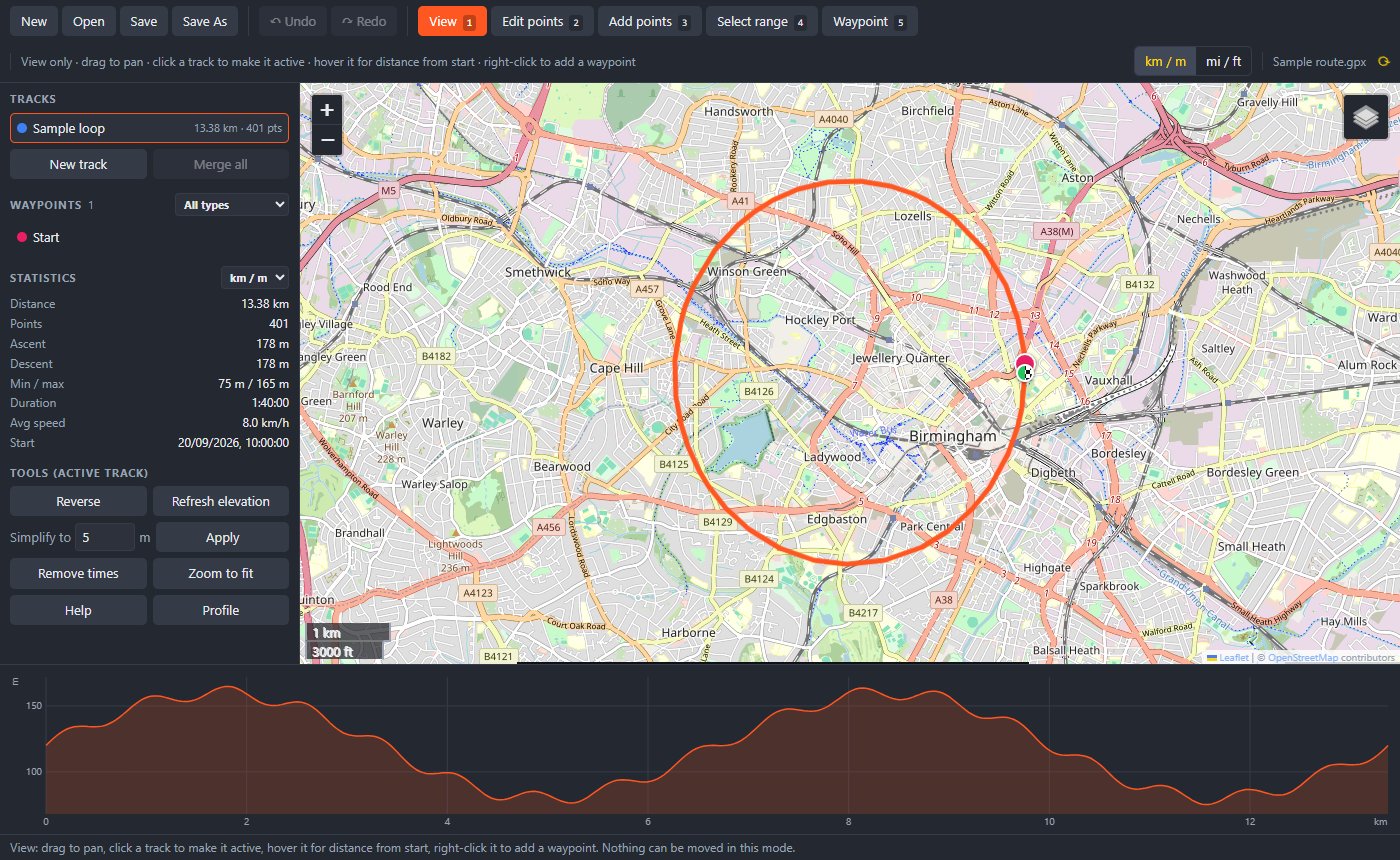
Plan and tidy up routes on a proper map. Drag the line where you want it, snap it to paths, mark your camp and water stops, and check the climbs before you go.
Version 1.0 · Windows 10 and 11, 64-bit · No administrator rights needed
Why I made it
I plan a lot of walking and wild camping routes, and the GPX files are never quite right. Some have a detour I don't want, some have a section that cuts through a field, and some have nowhere marked to fill up with water. Online editors do the job, but I wanted something on my desktop that opens .gpx files with a double-click, remembers how I like things, and marks the waypoints I actually care about: camp spots, water, pubs and hazards.
What it does
Edit by dragging
Drag any point, or press on the line and pull out a new one the way you would in Google Maps. Right-click to delete.
Follow roads and paths
Turn on routing and new sections snap to the path network. There are hiking, bike, road-bike, car and shortest profiles to choose from.
Fix a section
Select a stretch with a box or a lasso, then delete it, crop to it, split there or move it. You can also redraw the section between two points.
Waypoints for the trail
Built-in types include wild camp, campsite, water, shop, pub, viewpoint, transport and hazard, each with its own icon. You can add your own types too.
Elevation built in
Missing heights are filled in from terrain data. The elevation profile follows your mouse on the map and highlights whatever you've selected.
Five base maps
Choose OpenStreetMap, OpenTopoMap, CyclOSM, or Esri satellite and topo. It remembers the one you last used.
The numbers you need
Shows distance, ascent and descent, highest and lowest points, duration and average speed, in kilometres or miles.
Tidy up
Simplify dense tracks, strip timestamps, and reverse, merge, rename or reorder tracks. Full undo and redo.
Installing
- Installer: run
GPX-Editor-1.0.0-setup.exe. It installs for your user only, adds a Start menu entry and opens.gpxfiles when you double-click them. You can uninstall it from Settings › Apps. - Portable:
GPX-Editor-1.0.0-portable.exeis a single file that runs from anywhere. You open GPX files by dragging them onto it. - Maps, routing and elevation lookup need an internet connection. Editing works offline.
- The app isn't code-signed yet, so Windows SmartScreen may warn you. Click More info and then Run anyway.
SHA-256 (installer): d1af9e90b7983c69b1a045e6f0c0749a3f48a53a22b392f2c5981e81ed190a95
SHA-256 (portable): d0669f8b948bb22ea44e449e08803bc3c16d82fb7dfef1287f388551118d9f98